

Technical Search Engine Optimization
The Two Sides of SEO
- Search Engine Optimization (SEO) is focused on improving ranking in Google, Bing, and other web search engines.
- Depending where you live, the dominant search engine may not be Google. For example, Baidu is very popular in China and Yandex in Russia.
- Broadly speaking, SEO breaks down into two categories:
- On-Site or Technical: Coding and the server configuration.
- Off-Site: Social media, link building (getting other sites to link to your site), etc. Developers are less involved.
- Doing everything perfectly for technical SEO does not guarantee good ranking, especially in very competitive industries such as vacation rentals and e-commerce. However, doing things poorly for technical SEO will ruin your search engine rankings. For example, blocking the indexing of your site is a great way to vanish from search results.
Spiders, Indexing, and Ranking
- Web search engines employ robots (also called bots, for short) to visit web pages, follow the links on those pages, and put what they find (page content, images, URLs, etc.) into databases.
- The bots in this case are typically referred to as spiders, and they have recognizable names (passed via the User-Agent HTTP header), such as GoogleBot, BingBot, etc. The User-Agent information is stored in your server's access logs.
- Hundreds of bots roam the Web continuously. Some are harmless (GoogleBot and its variants might be viewed that way), some are helpful (checking for sites being down, so they can alert you), and others are malicious. They may be looking for server or scripting vulnerabilities to exploit, scraping all the content off your pages to be re-published elsewhere without your consent, or using your content to train AI models without your consent.
- Indexing is the term used to describe the process of recording what the bots find. In this particular case, the data is going into massive databases.
- Ranking is where a website is placed in the search results for a given query. Rank 1 is the first spot.
- Google has various spiders, including one focused on analyzing how a site works on mobile devices, and that is the one that is most often visiting. Google's entire index of the Web has shifted to being mobile-first, which means that they heavily weight how your site works on mobile devices. If the site isn't responsive or adaptive, it isn't going to rank as well for any query.
- These spiders have also matured significantly over the years, in terms of their capabilities. At this point Google's spider is running a version of Chrome and analyzing the rendering, even though it doesn't have a "user interface" (a screen) like we would use.
Keywords, URLs, and Markup
- Search engines rely on our code to provide them with a number of signals regarding what our site is about.
- The general rule is: the more unique the source of information is, the more weight (importance) it carries.
- For example, the words in the website domain and in the path to the file being viewed carry greater weight than text in a paragraph, because you only have one URL for a page, whereas you could have 50 paragraphs in the page. You had to pick-and-choose what to put in that URL, so it deserves increased weighting. Consider this example:
https://floridavacationrentals.com/longboat-key-florida/longboat-vacation-rentals.html
Clearly, that URL is communicating that the page is a good match for a query of 'Longboat Key Florida rentals'.
- The takeaway is that file naming and directory naming matter. Images should similarly be named something meaningful and not just
photo.jpg; they should also have excellentaltattribute text. Why? Because search engines cannot "see" the image - they are relying on the file name and thealtattribute to provide information about the image, to learn more about the "what" of the image so that relevant queries can retrieve it. - In the above example the URL was also
https(rather thanhttp); it is important that sites have SSL certificates, as that is another quality signal when sites are being ranked. Let's Encrypt is a free resource that many web hosting companies now leverage to generate SSL certificates. It used to cost around $100 a year for an SSL certificate, and now Let's Encrypt issues them for free. There are still various paid options, but for most sites the free ones do the job just fine. - The
<title>text is weighted more than other text in the page, as there is only one title per page. - Beyond that, you're looking at somewhat more value being given to text inside heading markup (h1 - h3 in particular) and to emphasis (strong, em, b, i). Most of the time there is a single
<h1>used, which is for the page name. Then you have<h2>,<h3>, etc., as the content dicates. Those headings reflect the document hierarchy, and should be used accordingly.
Improving the SERP Listing
- SERP is the acronym for Search Engine Results Page and any discussion of SEO spends a lot of time analyzing the SERP.
- The goal, of course, is to get users to click through to your site. And it can fall to the developer to make choices that will determine what is shown. At the very least, one needs to be in communication with the relevant team members (marketers, user experience personnel, the client) to determine what text to use. You may not be writing it, but you need to ensure that something acceptable is added.
- Consider the following annotated screenshot from a Google SERP:
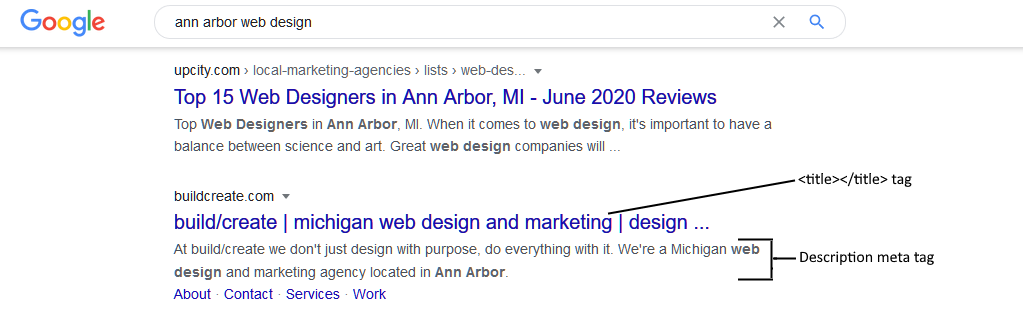
- As you can see, the
<title>plays a critical role. That is the linked text and the first text that is seen, so putting keywords at the beginning is essential. When this is written, it needs to convey important keywords in a natural fashion and be phrased to work well for the SERP as well as for a browser bookmark (since this is the bookmark's default text). The limit of what is shown is around 54 characters, but you can go a bit longer, if desired. - The description meta tag (
<meta name="description" content="" />) is also important, because the content for that tag is also shown in the SERP. While this is not used for keywords (at least for Google it is not used to determine what the page is about), it does communicate why the user should click through. So it's an opportunity to convince the user to click. This usually cuts off around 155 characters. If this is omitted, an excerpt of the page content may be shown instead, or a summary may be generated and shown. - If you are working with a page that is likely to be shown in various countries (and thus various languages), you can specify multiple meta descriptions, each with
langattributes identifying the particular language. Consider this one in German ("de" is the two-letter code for German):<meta lang="de" name="description" content="Wir sind eine Agentur für Benutzererfahrung, Marketing, Webdesign und Webentwicklung mit Sitz in Ann Arbor, Michigan." />
The search engine can then show this meta description in the SERP for a user whose browser language is set to German (basing this on their IP address location is also possible, but much more risky - what if the person is an English-only tourist visiting Germany?). There is also a German version of Google (at google.de), so visitors there are likely to see the German-language meta description.
- The final piece of most SERP strategies is to leverage microdata, as a means of having that data shown in the SERP as well. For example, you could have the average reviews rating for a product shown in the SERP, if that data was tagged appropriately.
Structured Data
- Much of the Web can generously be described as a "tag soup" - endless nested divs with no hope of knowing what any of the content trapped in those divs really is (for example, is that a sale price or the regular price, or not even a price at all).
- Structured data aims to change that, by allowing us to tag data in a structured, descriptive fashion. It offers a way for bots to make sense of the "tag soup" and glean something meaningful from it.
- Structured data is a step toward the Semantic Web, which is a Web that humans as well as bots can understand.
- Structured data can be shown in the SERP; Google refers to these data pieces (such as prices, reviews, etc.) as "rich snippets" or "rich results".
- There are 3 types of structured data:
- JSON-LD
- microdata
- RDFa
- Google favors JSON-LD, but we will focus on microdata, as it is easier to write and comprehend. RDFa is more complicated than microdata as well.
- It's safe to say that there are tradeoffs between the three options, with microdata and RDFa relying on tagging visible text. JSON-LD has no such restriction, but it has a more challenging syntax.
- While it takes time to get any of these approaches implemented, it is worth the effort.
- The schema.org website has details for a wide variety of content types and has examples in the various structured data formats (as you examine a content type on schema.org be sure to scroll to the bottom of the page for the examples).
- schema.org organizes the content types into a hierarchy, moving from more generic types to specific instances. For example, there is a specific set of data properties for an Audiobook, which include properties from five other, larger content types (Thing > CreativeWork > MediaObject > AudioObject, as well as Thing > CreativeWork > Book).
- Let's assume we have a product detail page to tag with microdata. Consider the "before" state of this product:
<!DOCTYPE html> <html lang="en" dir="ltr"> <head> <meta charset="utf-8" /> <meta name="viewport" content="width=device-width" /> <title>Microdata "Before" Example</title> </head> <body> <div class="row"> <h1>Sample T-Shirt</h1> <p> <img src="sample-tshirt.jpg" alt="Sample T-Shirt shown from the front" width="458" height="459" /> </p> <div> <strong>Product Code:</strong> </div> <div> <strong>ABC123</strong> </div> <div> <strong>Price:</strong> </div> <div> <strong>$30.00</strong> </div> <div> <strong>Quantity:</strong> </div> <div> <input type="number" min="1" value="1" id="qty" size="3" name="quantity" required="required" aria-label="Quantity" /> </div> <div> <strong>Size:</strong> </div> <div> <select name="size" aria-label="Size" required="required"> <option value="">Select a Size</option> <option value="ABC123_8834">S</option> <option value="ABC123_8835">M</option> <option value="ABC123_8836">L</option> <option value="ABC123_8837">XL</option> <option value="ABC123_8838">XXL</option> </select> </div> <div> Sample product description text </div> </div> </body> </html>- And then compare that to the "after" state, with the appropriate microdata applied:
<!DOCTYPE html> <html lang="en" dir="ltr"> <head> <meta charset="utf-8" /> <meta name="viewport" content="width=device-width" /> <title>Microdata "After" Example</title> </head> <body> <div class="row" itemscope="" itemtype="http://schema.org/Product"> <h1 itemprop="name">Sample T-Shirt</h1> <p> <img itemprop="image" src="sample-tshirt.jpg" alt="Sample T-Shirt shown from the front" width="458" height="459" /> </p> <div> <strong>Product Code:</strong> </div> <div> <strong itemprop="mpn">ABC123</strong> </div> <div> <strong>Price:</strong> </div> <div> <strong itemprop="offers" itemscope="" itemtype="http://schema.org/Offer"> <span itemprop="priceCurrency" content="USD">$</span> <span itemprop="price" content="30.00">30.00</span> </strong> </div> <div> <strong>Quantity:</strong> </div> <div> <input type="number" min="1" value="1" id="qty" size="3" name="quantity" required="required" aria-label="Quantity" /> </div> <div> <strong>Size:</strong> </div> <div> <select name="size" aria-label="Size" required="required"> <option value="">Select a Size</option> <option value="ABC123_8834">S</option> <option value="ABC123_8835">M</option> <option value="ABC123_8836">L</option> <option value="ABC123_8837">XL</option> <option value="ABC123_8838">XXL</option> </select> </div> <div itemprop="description"> Sample product description text </div> </div> </body> </html>- In the above example we have a Product containing an Offer for that product. The
itemscope itemtypeattributes are applied to a wrapper element. Inside of thatitemtypewrapper areitemprop(short for 'item property') attributes that are applied to markup that surrounds specific data (identified by theitempropvalue).- If all else fails, using
<span>for theitempropis acceptable, as that is a neutral inline element, with no impact on rendering and no accidental extra meaning coming with it.- Microdata largely depends on having the tagged data visible, so that can sometimes result in having to adjust some content, in order to be able to wrap it in markup with
itemprop.- There are two free validation tools you can leverage to check for errors and warnings:
- Warnings from the validation tools are permissible, as usually you don't have all the data they want included. So warnings are ok, but be sure to fix validation errors.
- There are also paid validators out there and other SEO-related toolkits that involve structured data, but I can't speak to their quality.
Duplicate Content Considerations
- Google will penalize websites if they have duplicate content - multiple URLs with substantially the same content.
- From Google's perspective you are likely trying to manipulate their results and "game the system".
- While duplication is sometimes intentional (the client was lacking in creativity and wanted to repeat the same content on many pages), it is often an accident, or the result of a less-than-ideal approach to website development.
Common Duplicate Content Scenarios
- You are not enforcing 'www' (or the lack of it) and you are not forcing https: In this scenario you have 4 URL variations that load the exact same page, so 3 of these are viewed as duplicates (and links from other websites to the 4 variations dilutes the value of those links, because Google views each URL as being distinct from the others and the inbound link benefit is being split across the 4 URLs):
https://www.sampledomain.com/products.html
http://www.sampledomain.com/products.html
https://sampledomain.com/products.html
http://sampledomain.com/products.htmlSolution: In your
.htaccessfile, redirect all traffic to https (if you have an SSL certificate installed) and also redirect to either the 'www' or the non-www version. These should be permanent (301) redirects rather than temporary (302) redirects. You are forcing attempts to load any of those 4 variations to a single variation. - You have multiple versions/variations of the same content across different pages: In this case you want to tell Google (and other search engines) which one of them is the canonical version (the authoritative version to use). If you do this, you will not be penalized for duplicate content because the search engine ignores the non-authoritative / non-canonical versions.
Solution: Put a
<link />tag identifying the canonical URL in all the pages that are duplicates or substantially overlap on content; all of them should use the same URL in thehrefattribute, which is the absolute URL of the page that you want the search engine to favor:<link rel="canonical" href="https://sampledomain.com/some-file.html" />
Also include that tag in the page that the URL is referencing (so it is referring to itself as the authoritative location).
- You have a different mobile site that largely mirrors the content of the desktop/laptop site: While responsive sites are much preferred, there are cases where a standalone mobile site exists.
Solution: Use canonical link tags, either favoring the mobile site or the desktop/laptop site, so all the mobile pages reference their desktop/laptop equivalent page (or vice versa).
Controlling Indexing
- There are various options for controlling what a search engine will index. Only the items that are indexed will be able to show in the search results.
- Reputable search engines will follow these standards. Bots that are malicious will ignore these directives and will do whatever they want.
Directory-Level Indexing: robots.txt
- Directory-level indexing is controlled via a
robots.txtfile placed in the directory where your website resides. This file is used to instruct bots not to index files in certain directories, and it is the first file that a visiting bot will try to find. A sample, with bots not indexing the 'admin' and 'private' directories:User-Agent: * Disallow: /admin Disallow: /private
- There are robots.txt validators for testing your file, since typos here could prove disastrous.
- Subdirectories can have their own robots.txt files, which then control access to files deeper in your website's directory structure.
- If you want to learn more, there are extensive robots.txt guides available.
- It is possible for these instructions to be bypassed if another website has linked to a file in a restricted directory, and a bot is following that link. In that case the bot is not checking the robots.txt file and is likely to index what it finds.
- Malicious actors will also attempt to view the contents of those directories, so be sure to disable directory listings in your
.htaccessfile (if necessary; the web server ideally has them already disabled).
File-Level Indexing: robots meta tag
- File-level indexing control is via the robots meta tag, such as:
<meta name="robots" content="noindex,nofollow,noimageindex" />
The above indicates that the file should not be indexed, that links in the page should not be followed, and that images in that page should not be indexed.
This only works for HTML files, so doing something similar for PDFs and other content that is not a web page involves setting an 'X-Robots-Tag' header with the same values.
XML Sitemaps
- The final indexing-related consideration is the creation of a
sitemap.xmlfile (often called an XML Sitemap), which lists out the URLs of all your web pages, PDFs, etc. There are a variety of free XML sitemap generators out there - just do a web search and you will find a number of them exist. - The
sitemap.xmlfile resides in the same directory as therobots.txtfile (the directory where your website resides). There is a limit of 50,000 URLs per file, and the file itself cannot exceed 50 megabytes when uncompressed, so on truly massive sites you may have multiple sitemap files and you can have thesitemap.xmllink to all the other sitemap files. - Google has also come up with other sitemap variations, such as image sitemaps, video sitemaps, and news sitemaps.
- Sitemaps can be submitted through Google's Search Console, Bing's Webmaster Tools, and can also be referenced from the robots.txt file.
- To summarize, robots.txt and the robots meta tag are used to block indexing, and XML sitemap files are intended to encourage indexing by notifying a search engine of all your content (it's possible you failed to link to a page or two in your navigation bars and content). As developers, we need to be sure that all of these are being handled properly.
Localized Sites
- In some cases you will find yourself developing similar sites for various markets. For example, you have a site for a United Kingdom domain (.co.uk), a German domain (.de), and a French domain (.fr). The client sells in all those markets and needs a version of the site to show to those visitors.
- Beyond the need to have good translations, and the challenge of getting the domains registered, there are other considerations.
- One is related to privacy, as a European Commission ePrivacy directive mandates clear disclosure of how cookies are being used and user consent in some cases, so that is relevant to European Union countries. This is why so many websites have you opt into cookies and provide details regarding how they are used.
- For e-commerce sites where customers are in the European Union there are GDPR compliance considerations.
- There are also country-specific pages that sometimes need to be added. Germany, for example, requires an Impressum page with details about your company.
- Part of a developer's job is to be raising these concerns and asking questions, because ultimately the client would ask why we didn't say something (and they got into legal trouble with their customers).
The
hreflangAttribute- Another consideration is controlling not only what Google.com shows, but also what country-specific versions of Google (or other search engines) show, since Google has dozens of variations that are specific to a given country (e.g., google.co.uk, google.de, google.es). This is where the
hreflangattribute comes into play. - Let's assume you have built a site for a United States audience, a version for a United Kingdom audience, and a version for a German audience.
- The pages across the various sites would all have
rel="alternate"<link />tags withhreflangidentifying the language (these tags always go in the head region of your pages). For example, on the home page for all 3 websites you would have:<link rel="alternate" href="https://www.site.co.uk" hreflang="en-gb" /> <link rel="alternate" href="https://www.site.de" hreflang="de" /> <link rel="alternate" href="https://www.site.com" hreflang="x-default" />
The .com site is the US English site (and the default). The .de is the German site, and the .co.uk site is the Great Britain (UK) English version.
These tags would be on every page that has alternate versions, and the absolute URL paths would be updated each time.
For example, in the History page on all 3 websites you would have:
<link rel="alternate" href="https://www.site.co.uk/history.html" hreflang="en-gb" />
<link rel="alternate" href="https://www.site.de/geschichte.html" hreflang="de" />
<link rel="alternate" href="https://www.site.com/history.html" hreflang="x-default" />
- As you can tell, extensive quality assurance testing is required, otherwise errors are likely to go into production.
- The value is that search engines now know the equivalent version of a page that would be a better option to show in the SERP. Users like content that is in a language they can understand. If they are on Google.com (which is for the United States market), but their browser is set to German, then they are likely to be shown the German version of the target page in the search results.
Helpful Tools / Systems
- It is always helpful to set up a Google Search Console account. This provides a variety of data about your website (from Google's perspective) and also allows you to submit your XML sitemaps and see how much of your site has been indexed.
- Bing has a Webmaster Tools system that serves a similar purpose and has a variety of SEO-related tools and reports.
- The Screaming Frog SEO Spider is also very popular; the free version works fine for smaller sites. It provides a wealth of information about the site.
- And then compare that to the "after" state, with the appropriate microdata applied: